Say what and where
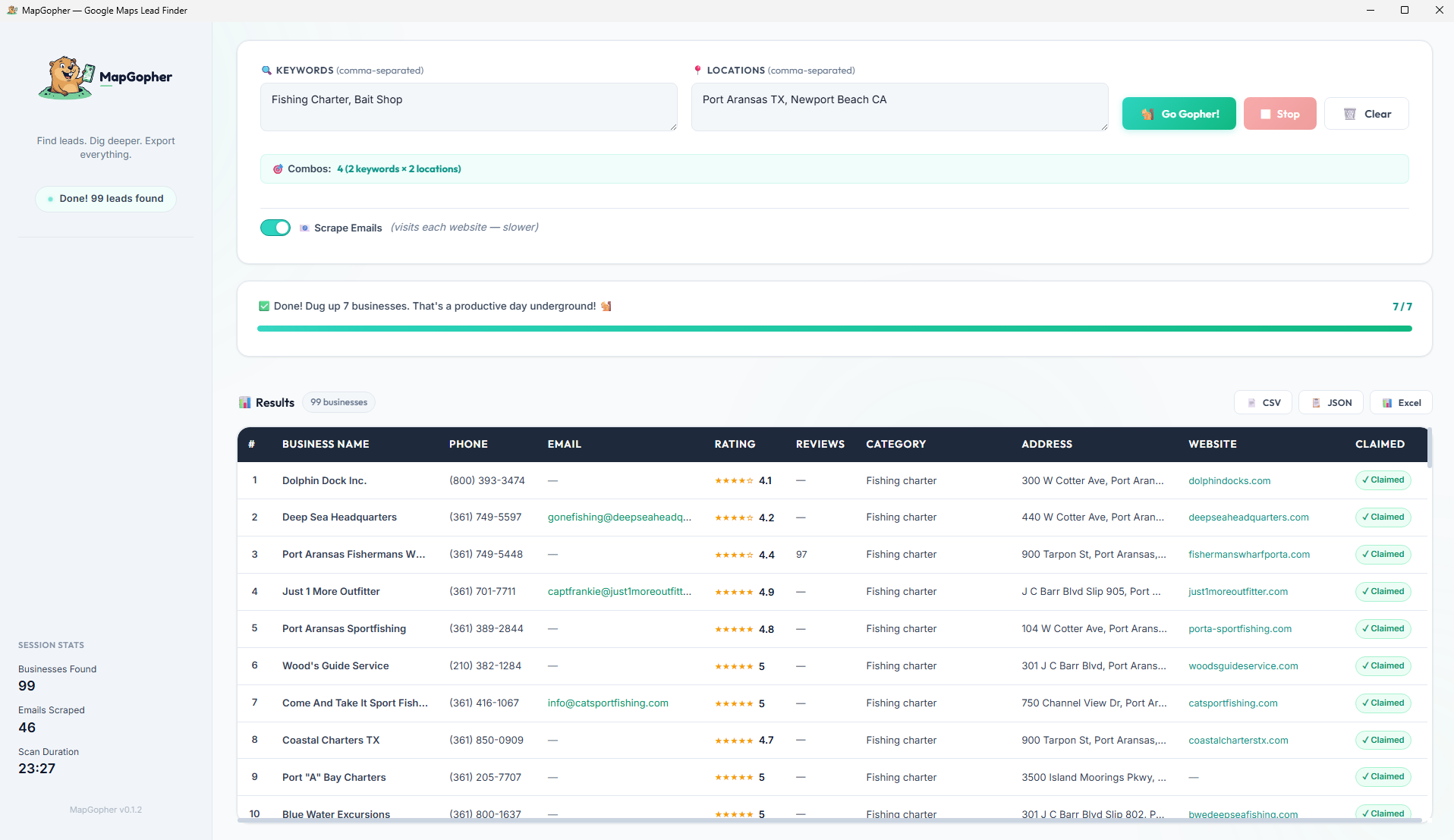
Type the kind of business you sell to, like "roofers", and the town. Separate several keywords with commas to run them in one go.
Type a kind of business and a town, or ask your AI agent to. MapGopher turns each Google Maps listing into a lead with its phone, website and email, saved on your computer.
There's no account to configure and no credits to buy; you install it and dig whenever you need leads.
Type the kind of business you sell to, like "roofers", and the town. Separate several keywords with commas to run them in one go.
MapGopher works through the Google Maps results in a browser in the background and saves each business as it lands, so you can start sorting before it's done.
Save the list as CSV, Excel, JSON or Markdown and open it in whatever you run cold email or calls from.
Picks up the Facebook, Instagram, LinkedIn and X links a business puts on its own website.
Each email it finds gets an MX check on its domain, which throws out addresses at domains that can't receive mail before they reach your list.
If you run big digs with lots of parallel searches, you can send them through your own residential proxy. Most people never need one.
Give it a town and a radius and Find nearby cities fills in the towns around it, so one dig covers a metro instead of one spot on the map.
Run digs yourself in the app, or switch on the built-in MCP server and let Claude Code, Codex or Cursor run the whole job for you. Either way it all happens on your own computer.
Type a niche and a town, hit Start dig, and watch the leads land. Filter, sort, copy a number and export when you’re happy with the list.
Ask in plain English. The agent picks the towns, runs the scan, filters to verified emails, exports the file and then keeps working on the leads: research, audits, first drafts.
Switch on AI agents
Settings → AI agents starts a private MCP server on your own machine.
Copy the setup prompt
One button copies the endpoint, the access token and the wiring steps.
Paste it into your agent
It adds MapGopher as a tool by itself. Restart the session and ask for leads.
The server only listens on your machine and every call needs your access token. AI agents are in every plan and in the 7-day trial; there’s no AI add-on to buy.
> Find roofers within 20 miles of Denver. Keep the ones with a verified email, check each website, and give me a sheet with a pitch angle for every lead.
● mapgopher · expand_radius(center: "Denver, CO", radius_miles: 20)
⎿ 11 towns, largest first
● mapgopher · start_scan(keywords: ["Roofer"], locations: 11 towns, scrape_emails: true)
⎿ Scan started · 11 searches
● mapgopher · get_scan_status(wait_seconds: 600)
⎿ Finished
● mapgopher · get_results(filter: { email_valid: true })
⎿ 58 leads with a verified email
● Fetch(58 websites)
⎿ 12 without HTTPS · 9 with no booking form · 4 sites down
● Write(denver-roofers.xlsx)
● Done. 58 roofers with a verified email, each with a pitch angle. The 25 with the weakest websites are at the top.
A list of local businesses is the starting point for a lot more than a cold call. Here’s what people ask their agent to do next.
“Visit each website and add the owner’s name, the services they list and whether they offer financing.”
MapGopher hands over the list; your agent reads the sites and fills in the columns you actually sell on.
“Which of these roofers have no website, no HTTPS or a site that breaks on a phone? Rank them as prospects.”
If you sell sites or SEO, the businesses with the worst web presence are your shortlist, and the audit doubles as your opening line.
“Compare ratings and review counts for every dentist in Austin and tell me who’s falling behind.”
Ratings, review counts and categories for a whole niche, sorted and summarised in plain English.
“Write a short first email for each verified lead that mentions something specific from their site.”
Personal openers for the whole list, saved as a sheet you load into the sequencer or CRM you already use.
“Find the plumbers who haven’t claimed their Google listing and write me a call script for each one.”
Every row is marked claimed or unclaimed, so the agent can go straight to the owners who need you most.
“Rerun last week’s electricians scan and show me only the listings that are new.”
MapGopher remembers when it first saw each listing, so the agent can hand you just the newcomers.
MapGopher supplies the leads and runs the scans. Reading websites, writing and anything else in these examples uses your agent’s own tools, so results depend on the agent you run. Setup details and every tool are in the AI agents guide.
Mostly freelancers and small teams who sell to local businesses and are tired of paying per lead.

Run one dig per client, niche and service area, then hand each of them their own spreadsheet.
A file per client
Filter for unclaimed Google Business Profiles and you have a list of owners who've never touched their listing, which makes for an easy opening line.
Unclaimed filter
Search town by town or neighborhood by neighborhood for the commercial and residential businesses you want to work with.
Search by area
Give each rep a fresh list to work, with the phone, email and address for every business in one export.
Email + phoneFewer leads than a bulk data dump, but every one of them is a business you'd actually pitch.
Every row has the business name, phone and website, plus an email when the business publishes one on its site. Because you searched one niche in one town, the whole list fits the offer you're pitching.
One niche, one townYou run a dig, skim the results and export; nothing counts down while you do it, and there's no web dashboard to log in to.
Unlimited digs
Every feature, month to month. Cancel whenever.
One payment, then scrape whenever you need new leads.
Both plans get the same app. Unlimited digs, email discovery, keyword and location searches, CSV, Excel, JSON and Markdown export, claimed/unclaimed status, and Windows or macOS (Apple Silicon). The only difference is how you pay.
Staying monthly costs $14.99/mo for as long as you use it. After 10 months lifetime has cost you less, and every month after that saves you another $14.99.
Comparison excludes the free trial and any applicable taxes.
Before you buy
Mostly the maths. Most SaaS scrapers charge $40 to $100 a month and ration you with credits, while MapGopher is $149 once. If you build lead lists every month, it pays for itself in about 4 months against those tools (against our own monthly plan the break-even is 10 months, which is a different comparison). Your leads also sit in a local store on your machine, and MapGopher keeps no cloud copy of them.
Search narrow. A dig for "plumbers in Spokane" gives you a short list you can work through in an afternoon, which beats 10,000 rows you'll never call. People use the exports for cold calls, cold email and direct mail.
It visits each business's own website in the background, checks the contact pages and pulls the email address off them. You don't need a separate enrichment tool for that step.
Yes, every row is marked claimed or unclaimed. Agencies love the unclaimed ones: ringing an owner to say nobody has claimed their Google profile is about the easiest way into an SEO conversation.
None. MapGopher runs on your computer and your internet connection, so there's nothing to charge per lead and you can dig as often as you like. We'd still keep it moderate so your IP stays in good standing with Google; normal lead-gen use is nowhere near a problem.
Fast enough for focused research, and it isn't built for bulk spam. Scans run in a real Chromium-based browser, you choose how many searches run in parallel (1 to 8), and email discovery checks each address's domain before it goes into your export.
We watch Google Maps for changes, and when it moves things around we ship a free update so the scraper keeps working. Monthly and lifetime customers both get those updates.
A Windows PC (x64) or a Mac with Apple Silicon. MapGopher drives a Chromium-based browser for scans: on Windows it finds an installed Google Chrome, Chromium or Microsoft Edge, and on macOS it also picks up Brave and Chrome Canary. You can point the CHROME environment variable at a specific browser if you'd rather choose. With no browser installed, MapGopher downloads Chromium the first time you scan, which needs an internet connection once.
Business name, address, phone number, website, rating, review count and whether the profile is claimed, plus an email address when it can find one on the business's website. You can export all of it to CSV, Excel, JSON or Markdown.
It's a desktop app. Your leads and scan history live in the app's local store on your computer, and there's no MapGopher cloud copy of them. The app does connect out for a few things: a license check at launch, Google Maps and business websites during a scan, and DNS lookups when it validates emails. The data and privacy page in the docs lists every one of them.
Any agent that supports MCP over HTTP, which includes Claude Code, Codex and Cursor. Switch on AI agents in Settings, copy the setup prompt and paste it into your agent; it connects itself. From then on you can ask for leads in plain English, and the agent runs the scan, filters the results and exports the file, then keeps going with your own follow-ups like researching each business. The server runs on your computer, and it's included in every plan and the 7-day trial.
Yes; every dig is a keyword plus a location. "Dentists" in "Austin" or "landscapers" near "Miami" both work, and you can line up several of each in one dig.
Still have questions?

Ready to start?
The monthly plan starts with 7 days free with every feature, AI agents included, then $14.99 a month. Rather pay once? Lifetime is $149. Both plans get every update.
Start your free trial